

Amazon seller reimbursement: The Guardian of your margins
Every shipment is a leap of faith. Your products are packed with purpose, profits forecasted with precision.
But when items vanish behind FBA’s closed doors, your business goals take a detour.
Amazon’s reimbursement policy? It’s the invisible hand pulling you back to balance when fulfillment chaos strikes.
FBA has won the trust and credibility of most sellers like you to utilize their warehouse. There are chances where mishaps can happen.
Amazon never left you alone to sacrifice the product cost. You can regain the lost investment for the products that disappeared under their surveillance.
All you need to practice is an “Amazon reimbursement claim.” Well, sounds like a great relief!
Did you know that your claim gets validated before the lost investment is reimbursed?
You have to be careful to abide by their guidelines to get things done.
What does the Amazon reimbursement policy 2025 state? And how to make the claim?
If it’s new to you, it’s an advantage when you partner with Sequence Commerce to handle your requirements.
Self-learning excites you to do better. So, here is the article crafted to provide a deeper understanding of the information you are seeking.
Continue reading.!
What is Amazon Reimbursement?
Using Fulfilment by Amazon (FBA) essentially means you are relying on Amazon to manage your goods from storage and handling to customer delivery.
However, not everything goes flawlessly. Occasionally things go missing, break, or just fail to finish the procedure as intended.
That’s where Amazon’s FBA reimbursement comes in. Amazon will pay you back if your goods are damaged or lost while they are handling it.
Imagine you send Amazon 100 units of your best-selling phone cover. A few days later, you see only 98 have checked in and are up for sale.
You contact support; after a fast inquiry, Amazon verifies two items were missing upon receipt. In such a situation, they will compensate you for the missing items if your eligibility meets their guidelines.
Usually compensation depends on your reported production cost or an estimated value if you have not given one.
However, you need to wait 45 days after the event to initiate a claim. In addition, every FBA seller has a maximum of 18 months to submit the claim.
How to File an Amazon FBA Reimbursement Claim (2025)
As an Amazon seller, this information can come in very handy! Read along to find out all about the Amazon reimbursement process.
Step 1: Identify the Issue
Start by spotting the error. Is it missing inventory, damaged goods, incorrect fee deductions, or a refund Amazon issued but never credited back to you? Check your reports and sales history to catch anything unusual.

Step 2: Collect Your Evidence
Amazon won’t just take your word for it, you need proof. Gather relevant documents like order IDs, shipment tracking details, invoices, or warehouse reports to back up your claim. The stronger your evidence, the smoother the process.
Step 3: Submit Your Claim
Go to Seller Central > Case Log and click “Create New Case”. Clearly explain the issue, attach your supporting documents, and submit your request. The more concise and factual your explanation, the quicker Amazon can process your reimbursement.
Amazon gives you pre-set recommendations like “Amazon FBA reimbursement”, to choose from but if your issue isn’t listed, you can always navigate to “My issue is not listed”.

How to download Amazon Reimbursement Claim Report?
#1 Method: Steps for Amazon Seller Central (North America or similar marketplaces)
Step 1: Log in to Amazon Seller Central:
Step 2: Go to Reports → Fulfillment
In the left-hand menu, under “Payments”, select “Reimbursements”
(You may find it under Inventory Adjustments if viewing returns-related claims.)
Step 3: Set the date range you wish to view (e.g., last 30 days, custom range, etc.).
Step 4: Click “Generate Report”.
Step 5: After processing, you’ll see a Download link. Click to download the .txt or .csv file.
#2 Method: Alternative (Payments > Transaction View)
Step 1: Log in to Amazon Seller Central:
Step 2: Go to Reports → Payments
Step 3: Click on the Transaction View tab
Step 4: Filter by Transaction Type → Select Reimbursement
Step 5: Export the filtered results via Download Reports
How to verify Amazon Reimbursement Claim Report: Step-by-Step Guide

Step 1: Download the Reimbursement Report
Step 2: Review Key Columns in the Report
- Look for these important fields:
- Reimbursement ID
- Reason (e.g., Lost, Damaged, Customer Return)
- Reimbursement Amount
- Product SKU / ASIN
- Posted Date
These fields tell you why Amazon reimbursed you and how much.
Step 3: Match Against Inventory Adjustments or Lost/Damaged Items
To ensure all due reimbursements were paid:
- Cross-check with the Inventory Adjustment Report (Reports > Fulfillment > Inventory Adjustments)
- Look for inventory marked as lost, damaged, or disposed
- Identify if a matching Reimbursement ID appears in your Reimbursement Report
Step 4: Use Pivot Tables or Filters in Excel/Sheets
- Filter by reason (e.g., Lost in warehouse)
- Sum up reimbursement amounts
- Compare with the number of affected units in Inventory Adjustment Report
Step 5: Identify Missing Reimbursements
If you find items lost or damaged with no corresponding reimbursement, you can:
- Open a case in Seller Central:
- Help → Get Support → Fulfillment by Amazon → Reimbursement Inquiry
- Provide proof using both reports.
How to Open a Case and Follow Up on Missing Reimbursement Claims in Seller Central

Step 1: Double-Check the Reports
Ensure the item is marked as lost, damaged, or disposed of in the Inventory Adjustment Report.
Compare it against the Reimbursement Report to confirm that no reimbursement was made for the affected item.
Step 2: Open a Case in Seller Central
Navigate to Help in your Seller Central account.
Choose Get Support and then select Fulfillment by Amazon.
Next, select Reimbursement Inquiry.
Step 3: Provide Proof
Gather the necessary documents and attach them to the case.
Attach both the Reimbursement Report and Inventory Adjustment Report.
Include screenshots or any relevant details like Reimbursement ID, SKU/ASIN, and affected units.
Step 4: Submit Your Claim
Submit the case to Amazon and await a response.
Step 5: Follow Up
Monitor your case status in Seller Central. If you don’t get a response or reimbursement, reply to Amazon’s response or submit a follow-up inquiry.
Step 6: Request a Detailed Investigation
If your issue remains unresolved, request a more detailed investigation into the missing reimbursement. Ask for a full explanation of the process and why your reimbursement wasn’t issued.
Types of Amazon Reimbursement
Lost or Damaged Inventory (Before a Customer Orders)
What’s the deal?
This covers inventory that disappears or gets damaged while it’s in Amazon’s warehouse but before anyone clicks that “Buy Now” button.
How Amazon reimburses:
Starting March 31, 2025, Amazon will only reimburse you based on what it costs to make the product — not what you paid to ship it, store it, or get it through customs. So, no extras. Just raw manufacturing cost.
Your two options:
- Provide your costs yourself using the “Manage Your Sourcing Cost” page.
- Or let Amazon guess based on similar products. But let’s be honest, their “best guess” might not match what you actually paid.
Formula:
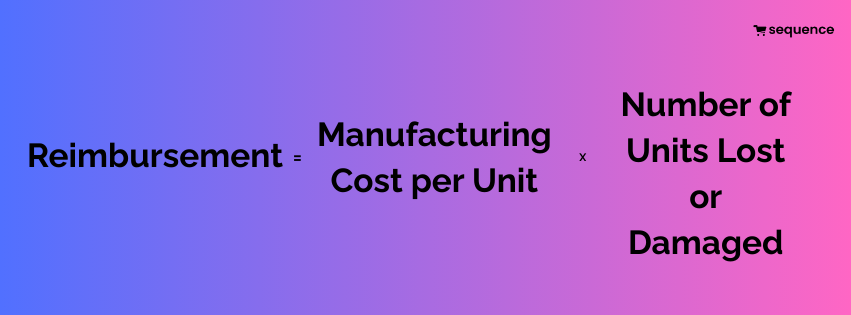
Example:
You send 100 protein shakers to Amazon. Manufacturing cost per unit: $6.50. Ten go missing in the warehouse.
If you’ve uploaded your cost, you’ll get $65 back.
If you haven’t, Amazon might only reimburse $40–$50 based on what they think it’s worth.
If 10 units are lost and your manufacturing cost per unit is $6.50:
$6.50 × 10 = $65
Note: If you don’t provide costs, Amazon estimates this based on similar ASINs, and the amount may vary.
Lost or Damaged Inventory (After a Customer Orders)
What’s the deal?
The product gets lost or broken after someone places an order — maybe during packing or on its way to the buyer.
How Amazon reimburses:
They’ll pay you based on the item’s sale price, but subtract all the usual Amazon fees — referral, fulfillment, etc.
Formula:

Example:
You sell a smart home light for $60, but it’s crushed during delivery. Amazon deducts $10 in fees, so you get $50 back. Not perfect, but better than a total loss.
Sale price = $60
Referral Fee = $6
Fulfillment Fee = $4
$60 – ($6 + $4) = $50
Customer Return Reimbursements
What’s the deal?
Sometimes customers say they’ll return an item but never do. Or they send it back in terrible shape.
How Amazon handles it:
If an item isn’t returned or comes back damaged beyond resale, Amazon will usually reimburse you automatically.
However, under the Amazon returnless refund policy 2025, there are scenarios where customers may be refunded without being required to return the item. While this improves buyer experience, it can pose losses for sellers—especially if the product isn’t reimbursed automatically.
If they don’t? You’ve got a 60–120 day window to file a manual claim. Don’t sleep on it!
Formula (for damaged/not returned items):

(Only if the return doesn’t happen or item is unsellable)
Example:
You sell a $40 yoga mat. The buyer returns it with deep scratches and dog hair (ugh). If Amazon doesn’t auto-reimburse, submit a claim before your time’s up — or the money’s gone for good.
Yoga mat sale price = $40
Total Amazon Fees = $5
$40 – $5 = $35 (If not auto-reimbursed, file a claim manually.)
Overcharged FBA Fees
What’s the deal?
Amazon sometimes overcharges fees because your product was incorrectly sized, weighed, or misclassified.
How to fix it:
Compare your product listing to the actual item.
If they’re charging you more than they should, file a reimbursement request.
Be ready to back it up with measurements or photos.
Formula:

Example:
You list your product as a small stuffed toy, but Amazon thinks it’s a medium plush toy and charges $2 more per unit in FBA fees. Multiply that over hundreds of orders — and you’re leaking cash.
Overcharge = $2 per unit
Number of orders = 300
$2 × 300 = $600
Destroyed Inventory
What’s the deal?
Amazon sometimes destroys your inventory without asking — or does it by mistake.
When you can claim:
If the destruction wasn’t authorized or was flat-out wrong, you may be owed a reimbursement. You just need to show that it wasn’t supposed to happen.
Formula:

Example:
You submit a removal request for a product, but Amazon mistakenly disposes of 30 units instead. That’s on them — and you should be compensated.
30 units destroyed
Manufacturing Cost = $5.75
$5.75 × 30 = $172.50
Shipment Discrepancies
What’s the deal?
You send Amazon a certain number of units, but they report receiving fewer than what was actually shipped.
What you can do:
Gather your shipping docs — tracking numbers, packing slips, and confirmation from your carrier.
File a claim if Amazon’s investigation doesn’t resolve it.
Formula:

Example:
You shipped 500 chargers; Amazon only logs 475. If they can’t locate the rest and you have proof, you’re eligible for reimbursement for the missing 25 units.
500 units shipped, 475 received
Discrepancy = 25 units
Cost per unit = $4.20
$4.20 × 25 = $105
What to Look for in Amazon Reimbursement Policy 2025?
Amazon is rolling out important changes to its FBA inventory reimbursement policy starting March 31, 2025. These updates will directly impact how you’re reimbursed for lost or damaged items and removal claims.
Reimbursement is now based on Manufacturing Cost
Previously, if Amazon lost or damaged your inventory, you’d be reimbursed based on your estimated sale proceeds.
That meant Amazon calculated your reimbursement based on your listing’s selling price, subtracting referral and FBA fulfillment fees.
With the 2025 update, Amazon will instead reimburse you based on your manufacturing cost. This is the amount you paid to your supplier or manufacturer to create or purchase the product—excluding costs like:
- Shipping or freight fees
- Customs duties
- Storage or warehouse handling costs
- Product prep or packaging expenses
This shift means your reimbursements may be significantly lower if your manufacturing cost is much lower than your retail price.
You’ll need to keep close track of your sourcing expenses to ensure you’re properly reimbursed.
You Choose How Amazon Calculates Your Manufacturing Cost
Amazon now gives you two options to determine the manufacturing cost used for reimbursements:
Option 1: Use Amazon’s Estimate
If you don’t submit your manufacturing costs, Amazon will estimate them using a variety of data points, including:
- What similar or identical products sell for on Amazon
- Prices listed by other sellers
- Wholesale market benchmarks
However, Amazon’s estimate may not accurately reflect your actual sourcing cost—especially if you get special supplier pricing, bulk discounts, or manufacture in-house.
Option 2: Enter Your Actual Cost
You can manually enter your real manufacturing costs into Seller Central. This gives you better control and ensures that Amazon doesn’t underpay you if their estimate is too low.
If you update your costs regularly, you’ll receive more accurate reimbursements and can avoid disputes later on.
Use the “Manage Your Manufacturing Cost” Page
To make managing these new rules easier, Amazon has introduced a new page called “Manage Your Manufacturing Cost” inside your Seller Central account.
You can access it through the Inventory section or via the Reimbursements dashboard.
Here’s what you can do with it:
- Add manufacturing costs for individual SKUs
- Bulk upload costs using templates if you manage a large catalogue
- Review Amazon’s estimated costs and compare them with your own
- Update outdated or incorrect values at any time
Keeping this information up to date ensures your reimbursements are based on accurate figures and helps prevent unnecessary loss of funds.
Lost Inventory Reimbursements Will Be Automatic
If Amazon happens to lose one of your products while it’s in their fulfillment center, there’s no need to stress or file a claim yourself. Reimbursements are now automated by default, meaning Amazon will handle the process for you—no action required on your end.
This change is a real time-saver, especially for sellers managing high inventory volumes.
But here’s where it gets important: the reimbursement amount is based on your product’s manufacturing cost.
If you’ve already entered that information in Seller Central, Amazon will use your data. If not, they’ll use their own estimate—and that could be lower than your actual cost.
Since the system is fully automated, you might not even notice if you’re being underpaid.
So, to protect your margins, make sure your manufacturing costs are accurate and up to date. It’s a quick step that ensures you’re properly reimbursed if something goes missing.
How the Amazon Reimbursement Policy 2025 Impacts Amazon Sellers?
Reduced Revenue Recovery
In the past, if Amazon lost your item, you would receive compensation close to the product’s market value or average selling price. This meant you recovered most of your potential profit.
Now, you’re reimbursed only your cost to produce or source that product.
Example
| Metric | Old Policy | New Policy (2025) |
| Selling Price | $40 | $40 |
| Product Cost | $10 | $10 |
| Amazon Reimbursement | ~$35 | $10 |
| Profit Retained | $25 | $0 |
| Loss to You | $0–$5 | $25–$30 |
Net result: You lose both potential profit and the opportunity to sell that product again. Multiply this across dozens or hundreds of units — and it severely affects your gross profit and bottom line.
Increase in COGS Pressure
What’s happening?
Under the new policy, Amazon now reimburses you based only on the product’s cost to manufacture or source. This cost, known as COGS (Cost of Goods Sold), becomes your sunk cost if the item is lost or damaged at Amazon’s warehouse.
Key Impacts:
Effective Cost Per Sale Increases:
For example, if 3 out of every 100 units go missing and you’re reimbursed only your COGS (say, $8), you’re not covering the $32 of profit you would’ve made on those units. Spread across hundreds of units, this leads to noticeable loss in net revenue.
Inventory Shrinkage Write-Offs:
Previously, Amazon’s reimbursements almost fully covered lost items. Now, you may have to treat them as inventory losses on your P&L, reducing your net income.
Unit Economics Becomes More Complex:
For bundled or multi-component products (like a skincare kit or toolset), if one piece goes missing, Amazon may reimburse based on the value of just that component, not the bundle’s full cost — leading to mismatched numbers in your books.
Impact on High-Margin & Private Label Products
What’s happening?
Sellers who create their own products (private label) or enjoy high-profit margins will see the biggest hit — because Amazon no longer considers the actual value or profit potential of an item when calculating reimbursement.
Example:
You sell a premium health supplement for $50.
It costs you only $7 to manufacture.
Under the old policy, you’d get back ~$45 (based on sales history).
Under the new policy, you only get back $7.
Result:
You lose $43 of potential income per lost/damaged unit.
You still have to account for that missing unit in your supply chain and marketing projections.
This kind of loss is painful, especially if you rely on every unit to drive return on ad spend (ROAS), cover fixed costs, or reinvest in inventory.
Administrative Burden = Hidden Cost
What’s happening?
If you believe Amazon’s reimbursement doesn’t reflect your true manufacturing cost, you must appeal the decision — which requires proof of value.
What Amazon Might Ask For:
- Supplier invoices showing what you paid per unit.
- Contracts with manufacturers.
- Labor and packaging cost breakdowns (especially if you assemble in-house).
- Historical cost documents and itemized receipts.
Why It Matters:
This process is time-consuming, especially if you have multiple SKUs.
You may need to hire virtual assistants or subscribe to reimbursement services to handle the appeals, which are recurring operating expenses.
These costs while not obvious at first — start to erode your net profit, making profit margins thinner.
Missed Deadlines = 100% Loss
What’s happening?
Amazon has implemented stricter timeframes for filing reimbursement claims. If you don’t detect and file claims in time, you forfeit the right to reimbursement — even if the loss was Amazon’s fault.
Claim Windows:
- Lost or Damaged Inventory: Within 60 days of the issue.
- Customer Return Not Received: Within 45–105 days, depending on the situation.
- Removal Order Loss (Lost in Transit): Within 15–75 days.
Why It’s Critical:
If you miss the window, you get no reimbursement at all.
That means you lose the product and any chance to recover the cost — a total write-off in your accounting.
For example, if 10 items worth $20 each go unclaimed past the deadline, that’s a $200 loss directly hitting your profit line.
Reimbursement Strategy to Amazon’s Updated Policy 2025
Loss Recovery Strategy
Why it matters:
Amazon handles your inventory across multiple fulfillment centers. Errors—lost inventory, damage, or incorrect handling—can cost you thousands annually if not proactively monitored.
Strategic Execution:
Set Audit Cadence: Weekly audits for fast-moving SKUs; monthly audits for slow movers.
Assign Responsibility: Designate a team member or VA to handle audits and claim filing.
Create a Recovery Workflow:
- Run Inventory Adjustment and Received Inventory reports.
- Match what Amazon received vs. what you shipped.
- Cross-reference with your invoices or tracking data.
- Track Recovery KPIs: Monitor reimbursement rate (% of claims approved), average claim value, and time-to-resolution.
Ticket Escalation
Why it matters:
Amazon’s customer service may decline claims or issue partial reimbursements if you don’t present a compelling data-backed case.
What you need to do:
- Spot Recurring Errors: Use pivot tables to spot patterns by:
- FC (Fulfillment Center code)
- Carrier
- Time of year (e.g., holiday surge issues)
Build Escalation Cases:
Include screenshots of reports
Highlight trend data (e.g., “This ASIN has gone missing 5x in 3 months at FC SMF3”)
Escalate through Account Health or Brand Registry support, not just the standard Seller Support channel. These teams have more power to resolve large reimbursement cases.
Fee Optimization
Why it matters:
Amazon determines your FBA fees based on product weight and size. An incorrect measurement—even by an inch—can drastically inflate fulfillment and storage fees.
What you need to do:
- Run an FBA Fee Preview Report
- Compare it to your own product specs.
- Look for items priced in the “Large Standard-Size” tier when they should be “Standard.”
Submit Re-Measurement Requests:
Go to the Manage FBA Inventory page, locate the ASIN, and open a case with “product dimensions are incorrect.”
Claim Refund for Overcharges:
Backdate your claims up to 90 days (or more with documented support).
Returns Monitoring
Why it matters:
Amazon customers can get refunded and still keep the product, or return used/damaged items. You lose revenue unless you track and claim appropriately.
What you need to do:
Audit High-Volume Return SKUs:
Track ASINs with >10% return rate. Use Customer Concessions and Returns reports.
Create a Return Status Matrix:
| SKU | Units Refunded | Units Returned | Condition | Reimbursed |
| ABC | 15 | 12 | Damaged | No |
File Non-Return Refund Claims:
If customers were refunded but didn’t return the product within 45 days, request reimbursement. To learn more, here is the article “Amazon returnless refund.”
Automation
Why it matters:
Manual claims are time-consuming, and your time is better spent scaling, not babysitting reports. Automating the process increases efficiency and reduces claim fatigue.
What you need to do:
Choose a Amazon Reimbursement Tool
GETIDA: Reimbursement-focused service with success-fee pricing.
Sellerboard: Affordable option with detailed claim automation.
Helium 10 Refund Genie: Ideal for Helium 10 users.
Strategic Claim Positioning
Why it matters:
Amazon can flag your account if you abuse the claim system or file too many frivolous requests. Prioritizing strong, impactful claims preserves your reputation while recovering real value.
What you need to do:
Prioritize High-Impact Claims
- Focus on claims that:
- Involve >5 units
- Exceed $50–$100 in potential recovery
- Are backed by invoices or shipment proof
Group Similar Claims:
Amazon prefers a single case for similar issues. Submit grouped ASINs or order IDs together.
Reopen Denied Cases (Strategically):
If a claim is unfairly denied, reopen it with,
- New evidence
- Clarified explanation
- Reference to Amazon’s FBA reimbursement policy.
Final Thoughts
It’s time to take control of your Amazon reimbursements!
The 2025 policy changes may seem challenging, but they present an opportunity for proactive sellers to outperform the competition.
While others leave money on the table, you can build a reimbursement machine that protects your hard-earned profits.
You must focus on both revenue growth and loss prevention. Your commitment to mastering the reimbursement process isn’t just about recovering costs.
It’s about developing the financial discipline that separates your Amazon businesses from struggling.
The Sequence Commerce team is standing by to supercharge your recovery efforts. Don’t wait until you’ve lost thousands in potential reimbursements.
Reach out now and turn this challenge into your competitive advantage!

Nischita Narayan serves as Content Strategist at Sequence Commerce, where she develops strategic content for Amazon sellers seeking to optimize their marketplace presence. With 4 years of specialized experience in e-commerce content creation, Nischita has developed a systematic approach to crafting product listings, A+ Content, and brand stories that align with Amazon’s search algorithms while engaging potential customers.
At Sequence Commerce, Nischita has implemented content optimization frameworks that have helped clients achieve measurable improvements in listing performance and conversion rates. Her expertise includes keyword research methodology, competitive content analysis, and creating conversion-focused copy specifically tailored to Amazon’s marketplace. Nischita regularly analyzes content performance data to refine strategies and adapt to Amazon’s evolving content requirements.
Before joining Sequence Commerce, Nischita worked with e-commerce brands across multiple product categories, developing an in-depth understanding of effective content structures for different types of Amazon listings. She combines her knowledge of Amazon seller strategies with content best practices to help brands stand out in competitive niches. Through the Sequence Commerce blog, Nischita shares practical insights on content optimization techniques backed by real-world testing and results.
Was confused about the verification process at first, but this guide made it click. Much more confident now.
More paperwork for sure, but worth it if you actually get paid back. Documentation is everything.
Never realized how much I was missing until I started auditing regularly. Eye-opening stuff.
It’s not just about lost inventory – this affects cash flow big time. Had to adjust my whole business model.
The tip about grouping similar claims actually works. Amazon support seems more responsive that way.
Amazon wins again.
I’m worried Amazon might lowball the manufacturing cost estimates. Definitely updating my actual costs in Seller Central ASAP.
Margins completely destroyed.
Hi there I am so happy I found your webpage, I really found
you by error, while I was looking on Aol for something
else, Regardless I am here now and would just like to say kudos for a incredible post and a all round exciting blog (I
also love the theme/design), I don’t have time to browse
it all at the minute but I have book-marked it and also added your RSS feeds,
so when I have time I will be back to read much more, Please do keep up
the great work.
Great read!
This policy change hit my margins hard. Only getting manufacturing cost back instead of retail price is tough for small sellers like me.
Thanks for breaking down the filing process. That 60-day window is pretty tight – staying organized is key now.
Been using a third-party service for this – they catch way more missed reimbursements than I ever could manually.